
An unbiased guide to buying an electronic drum kit.
Making sense of the features and options of e-drum kits
Buying an electric drum kit can be a confusing process - especially if you are new to drumming and looking to buy your first kit for practising drums at home. The aim of this guide is to answer some of the most frequently asked questions and to point you in the right direction when looking for an e-drum kit to buy.
First up - we do not sell drum kits here at Elephant Drums. We only teach drum lessons. We care about drum learners finding the right equipment to learn, practise and play drums. So this means we are able to be totally unbiased and don't endorse any specific drum brands. The information below will help you make an informed choice about what type of e-kit is best for your needs.
Update...
Based on your feedback, we’ve written a follow-up article showcasing e-kits tailored to different levels and budgets. It highlights examples of electronic drum kits that offer great value-for-money, making it easier for you to find the perfect kit for your needs. Read it here – https://www.elephantdrums.co.uk/blog/guides-and-resources/best-value-electronic-drum-kits/

Why buy electronic drums?
Like most technology in recent years, electronic drum kits have increased in options and features, whilst at the same time they have decreased in price. This makes e-kits an affordable and practical option for anyone who wants to practice drums at home.
For a comparison of the pros and cons of electronic drums vs acoustic drum kits check out our previous article here: Drums buying guide - acoustic vs electronic drum kits
Here is a quick run-down of some of the common positive and negative comments people say about electronic drum kits.
Pros and cons of electronic drums
Positive
- They make much less ambient noise than acoustic drums
- They take up less space and can be easily packed away if they need to be stored
- Most electronic drum kits have built-in training tools, a metronome, and play along songs
- You can easily switch between different sounding drum kits and edit the voices on many models
Negative
- Only the top of the range models begin to replicate the feel and tone of an acoustic drum kit
- Electronic kits can be more prone to damage and faults
- There can be sensitivity issues - for example, pads might not trigger as intended
Knowing what you need
Perhaps the most difficult part of starting to look for an electronic drum kit is knowing what you actually need from your e-kit. What do you want it to be able to do? All the features listed in the specifications might all sound very nice, but do you really need them? Or will a cheaper drum kit with fewer features do the job you want it to do?
Understanding the specs
If you are new to the world of e-drum kits, the details in the technical specifications can be a bit confusing. For example, the meaning of terms like "trigger zones" might not be immediately obvious. And it doesn't help that one manufacturer might call a feature by one name and the next manufacturer calls it by a different name!
See the glossary further down this page to help understand the specifications. This will help you make informed decisions and be able to properly compare the specs and features of kits made by different manufacturers.
Before getting into the more technical side of things, first get familiar with the setup and layout of electronic drum kits in general.
Standard setup for e-kits
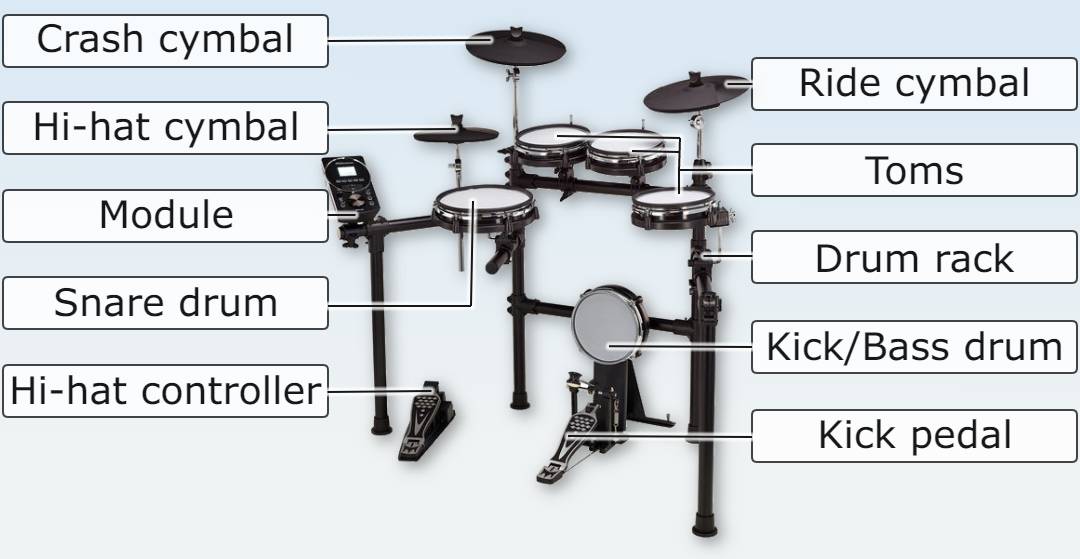
Most electronic drum kits are sold in the following 'standard' configuration. Many e-kits usually have the option to expand the setup with additional drum or cymbal pads which are sold separately. The diagram below is the way most electronic kits would come "out of the box".
Drum pad material
The majority of kits come with either rubber pads or mesh heads (or a mix of the two - for example, mesh snare and rubber toms). Cymbal pad surfaces will generally be made of rubber, with the fixings and support made of other materials such as plastic, acrylic or metal.
Rubber vs Mesh drum pads - which is best?
Below are some points to consider about rubber vs mesh pads, to help you decide whether the mesh or rubber type heads are the best choice for you.
Quite a few models of e-drum kits come with a mixture of both mesh and rubber (for example, mesh for the snare drum and rubber for the toms). This can be a 'best of both worlds' approach, and may suit most drummers starting out with e-kits.
Also remember that it is almost always possible to change from rubber to mesh (or the other way round if you wanted) by buying a new pad or pads, but keep the drum module the same.

Rubber Pads:
key points -
- Cheaper
- Consistent
- Compact
Rubber pads are usually cheaper and appear on the budget drum kits. Although, that is not always the case. Some 'rubber' pads are actually covered in textured cellular silicone, making them more expensive than some of the mesh heads. Some rubber pads allow more advanced features like 3-zone triggering (most mesh heads support 1 or 2 zones). For more info about trigger zones, see the glossary further down the page.
You might choose rubber pads because they are usually more compact and therefore space-saving. You also get a consistent feel when playing the kit, as all drum pads feel the same when hit.
Mesh Heads:
key points -
- Responsive
- Realistic
- Adjustable
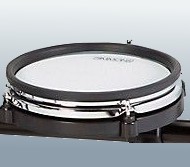
Mesh heads are generally more responsive than rubber pads, depending on the capabilities and settings of the drum module (check out the glossary below for definitions of terms like sensitivity, velocity curve, threshold and dynamic range).
Hitting a mesh pad is a more 'realistic' feel compared to rubber - and on most mesh heads you can adjust the amount of tension to your own preferences (much like tuning an acoustic drum will change the tension of the drum skin).
Out in the room, the ambient noise is quieter than hitting hard rubber pads.
Kick pad or integrated kick
Integrated kick/pedal
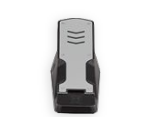
The budget end of the range usually come with an 'integrated kick' pedal. This is where all the electronics are built into the same casing as the pedal itself. For people who are used to playing on an acoustic bass drum this can feel rather unnatural and not as responsive as they are used to playing. On the other hand, if the integrated kick pedal is beater-less it might make slightly less noise than the pedal-and-pad type. This is an advantage where noise needs to be kept to the absolute minimum.

Kick tower/pad
Going up the price range a little bit, e-kits come with a kick tower or rubber pad. This pad is played with a separate kick drum pedal. The kick drum pedal would usually be purchased separately so you can choose a pedal to suit your playing style and budget. Many drum shops will also sell "bundle" deals so that they include a kick drum pedal with the kit.
This setup is the loudest of the pedal/pad combinations. If you have particularly sensitive neighbours you might want to bear in mind that the beater will be striking the pad with quite some force and it means vibrations will unavoidably travel to the floor.

Mesh kick pads
At the more expensive end of the spectrum, you'll find the e-drum kits have kick drum pads that feel and play a lot more like an acoustic bass drum. They are usually larger in diameter too. As we talked about earlier, mesh heads have a more responsive feel and can be 'fine tuned' to your exact preferences.
If having the option to play double bass drum pedals is important to you, then choose a kick pad that is big enough to accommodate double pedals.
Thinking of starting drum lessons, but you're not ready to buy a drum kit yet? Well that's totally fine - you don't need your own kit to begin drum lessons. There are many ways you can practice drums without drums! We will be able to cover practice techniques with or without drums in your introductory drum lesson.
Glossary of e-drum terminology
The words and phrases you're going to come across when searching for e-drums and reading online reviews. You might find it helpful to bookmark this page and return here to check up on these definitions when you're on your search for an electronic drum kit.
Voices
The sounds (drums / cymbals / percussion etc) the drum module can play. The sounds are basically mini recordings (samples) that are triggered when you hit a drum.
Drum Pad
The bit you hit! Usually a solid rubber pad or a mesh head. See the section on drum pad materials further up the page. In the context of full e-kits, it refers to each individual pad on the kit. Not to be confused with a sample pad (which is a smaller all-in-one unit, with the module and the pads contained in one case).
Zones
Every zone equals a sound that can be assigned to the pad. So one zone is one sound. Dual zone means there can be 2 separate sounds. 3 zones (or triple zone) means 3 sounds can be triggered from different areas of the pad.
MIDI In/Out
MIDI stands for Musical Instrument Digital Interface. On drum modules, MIDI Out is a connector you can plug in a MIDI cable to connect to an interface. This allows you to send signals from your e-drums to an external device such as music software capable of working with MIDI. Some drum modules also have a MIDI In socket. This means an external device can control the drum module and use the samples inside it.
Mix In / Aux In
The input where you can plug in an external audio device (such as a phone or MP3 player) into the drum module.
Virtual Instruments / VST
VST stands for Virtual Studio Technology. You might want to use your drum module to trigger sounds in a digital audio workstation (DAW) with VST.
Piezo
The small sensor disc which senses when a drum or cymbal pad is hit and converts it to an electrical signal. This signal is sent to the module and triggers the sound.
Triggering
Triggering is when the piezo senses a hit, it sends an electrical pulse to the module letting it know how hard you hit.
Sample
A recording of a sound.
One-Shot Sample
One recording of one sound (as opposed to Multi-Layered Samples). A one-shot sample is a basic sound which doesn't change in sonic qualities depending how a pad is hit, apart from the velocity.
Multi-Layered Samples
A collection of samples for one instrument. The properties of the sound will change depending how the pad is hit. This is intended to be more realistic and can also be used to create various effects.
Latency
The time from hitting the drum, to the time the sound is heard. Latency is measured in milliseconds. There is always a tiny amount of delay - due to the time it takes sound to travel from its source to the listener's ears. With electronics, there's the time it takes the electrical signal to travel down the wire, be processed, and then the resulting sound to reach the ears. The human brain is able to compensate for some latency, and most electronic drum kits fall within that acceptable range. Latency becomes more of a problem if you are layering up multiple processes, for example using your e-kit to trigger external samples or recording to a computer. If recording yourself is a priority, then you will need to investigate latency and ways to mitigate it.
Responsiveness
This describes how well the e-kit picks up your whole range of playing (the quiet, medium, and loud hits). There will be a point where hitting harder gets no louder, whereas hitting too softly simply triggers no sound at all.
Dynamic Range
Dynamic range is how many changes in sound there are from quiet to loud hits. A poor dynamic range might still sense the extremes of the loudest and quietest hits, but not provide much variation in the medium hits. Lack of dynamic range means it can sound a bit flat, unrealistic and non-musical.
Threshold
A setting in the drum module so you can set a limit on how hard you have to hit the pad before the module registers it. This is useful to combat false triggers and cross-talk.
Sensitivity
This is another setting inside the drum module. Your drum module interprets your drum hits based on the sensitivity settings. If you turn up the sensitivity, your soft hits will register as harder hits.
Velocity Curve
A setting to control the feel you're looking to get from your electronic drums. Similar to sensitivity, the drum module controls a map which translates incoming velocity values into other velocities in order to alter the feel or response.
Cross-talk
This can happen when hitting one pad, but the vibration causes a different drum or cymbal to trigger - even though you didn’t hit it! This can be very frustrating and off-putting. It can be caused by pads being positioned too close to each other or poorly designed drum racks meaning the vibrations travel to other pads.
Hot Spot
When the sound triggered is very loud when hit in the centre of the drum pad, versus a hit with the same force at the edge being very quiet.
Machine Gunning
This term describes when you play a roll of fast continuous notes and all of the sounds seem the same, it's like a 'machine gun' going off. There is no natural variety in the velocity or intensity of the hits, sounding machine-like instead of human. Whilst you sometimes might want to play a "machine gun roll", you don't want to always have to hear that. Try adjusting the sensitivity, threshold and velocity settings in the module, and find the right 'sweet spot' for your usual playing style.
Brands & manufacturers of e-drum kits

Everyone has heard of Roland and Yamaha. They are the two biggest brand names in the electronic drum kit market and have a full range of options, from super high end all the way down to entry level. Another familiar name is Alesis, who are a well-known brand in musical electronics in general.
Two names that are not specifically e-drum brands are Gear4Music and Thomann. Both of these are actually huge online music stores, but they stick their own branding on cheaper products - including a range of e-drum kits. Thomann's range goes under the name 'Millennium'. For a comparison to the big brand names, but on a budget, you might want to check out these shops. They also sell the products of the big manufacturers as well.
Need more information about brands and kits?...
There are some great value-for-money kits and bundles showcased here – https://www.elephantdrums.co.uk/blog/guides-and-resources/best-value-electronic-drum-kits/.
If you are in the market for something more bespoke, there are some 'boutique' companies and custom e-kit builders. If you have big bucks to spend and want something tailored to your exact requirements, including options for hybrid electronic/acoustic drum setups, the it is well worth seeking out the expertise of a custom e-drum company.
At the opposite budget end of the spectrum, you'll find manufacturers of e-kits on sites like Amazon and Ebay which you've probably never heard of, selling very cheap e-kits. These are sometimes "white label" goods where new branding or a new model name is applied to what is essentially the same kit as other kits available. If going down this route, it is well worth doing the homework and working it out, so you're sure what you are buying. If you find a product which is simply a repackaging of something else, read the reviews for the other product as well, to know if it is worth the money that is being asked for it. Re-branding of instruments can sometimes be an exercise in selling to a different target audience at another price point, or as a way to steer around less-favourable reviews that might have accumulated under a previous product name.
Buying new vs second-hand electronic kits
One more thing to consider is whether you are going to buy your electronic drums new or second-hand.
Your available budget and the price of the kits is the major factor here. You'll open up more options for your money if you're happy to search through the likes of Gumtree, Facebook Marketplace and Ebay. There are also other advantages and disadvantages to think about.
Buying new
Pros
- New kits will be, well, erm, new - and in pristine condition.
- It should come with a manufacturer's guarantee, so if something isn't right within the warranty period, it can be sent back for repair or replacement.
- It will benefit from up-to-date technology, if a recent model.
Cons
- It will be more expensive than buying an equivalent second hand kit.
- You need to be sure to check what is or is not included - remember e-kits usually do not come with the bass drum pedal or a drum stool (throne) unless it is specified. Accessories like headphones and a drum amplifier are optional extras.
Buying secondhand
Pros
- The kit should be complete and may even include extras such as drum throne, sticks and learning resources. Unless of course you are specifically looking to buy individual parts on their own.
- The pads, firmware, hardware etc may have been upgraded.
- You might grab yourself a bargain and find a near-new kit for a fraction of the original price.
Cons
- Some parts of the kit may show wear and tear and could be damaged.
- You may have to pay out more if you need to get any parts of the kit replaced soon after purchase.
- It may not perfectly match the description if bought online.
Hey guys
Long shot here but willing to try.
I have an Alesis strike pro.
I can’t get the cymbals to swell.
Where would I adjust the settings to accommodate that
Hi Stephen,
Thanks for the question. This is probably one for Alesis tech support (via their website). There should be settings to modify/edit the samples and effects on a kit like this. You might need to download Alesis’s editor software on your computer – check this with Alesis tech support. And maybe also check you’ve got the latest firmware installed.
🙂
I hope I could get help with buying a new set of electric drums someday.
Great article, thanks for the detail! Stuff makes a lot more sense now to a newbie 🙂